This is one piece of tech that has been around for about 10 years with so much unused potential. Glad to see that changing, with the Apple ecosystem finally putting its weight behind it. Let’s discuss that today.
WiFi Aware allows nearby devices to discover each other, pair securely and create a direct WiFi link without joining an access point. There is no router, DHCP server or internet connection in the middle. Your phone can also stay on its normal WiFi while talking to the device.
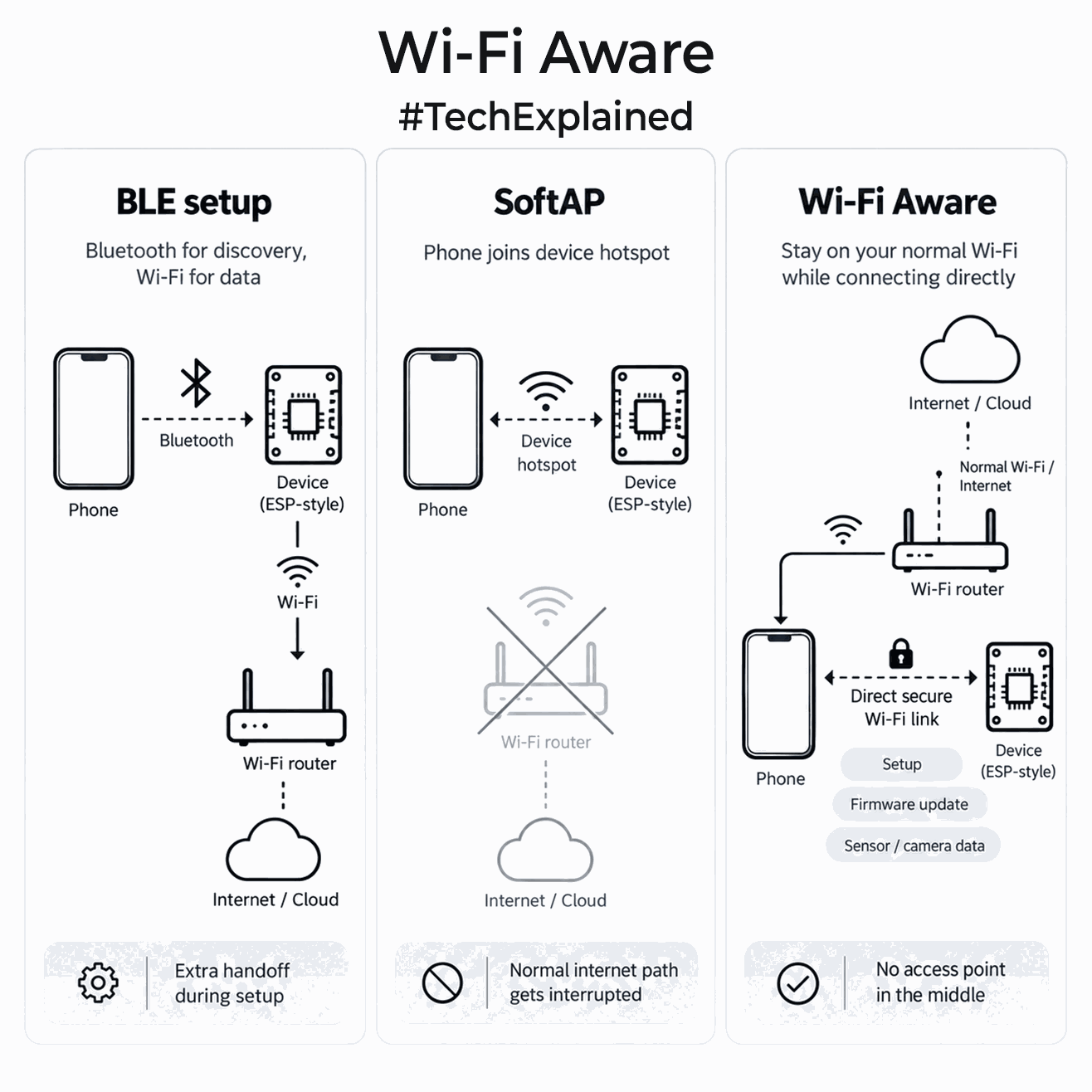
Things get interesting on the device setup side. Today, many connected products use Bluetooth only to find the device and pass WiFi credentials. Others create a temporary SoftAP, forcing your phone to switch networks just to configure the product.
With WiFi Aware, the app can discover the device, establish a secure connection and communicate over normal IP networking directly. That same link can be used for configuration, firmware updates, file transfer, camera feeds or higher-rate sensor data. If the product later needs cloud access, you can still pass the home WiFi credentials over this link. It also fits portable instruments, cameras and diagnostic devices that only need a fast local link to your phone, with no router involved.
Android has actually supported WiFi Aware since Android 8.0. The catch is that support depends on the phone’s WiFi chipset, firmware and manufacturer, so you cannot assume every Android phone has it. Apple joining with iOS 26 changes the ecosystem significantly because iPhone 12 and newer now support it.
Last month, Espressif also added WiFi Aware support for selected ESP32 families. It is still early, and support is not universal across ESP32 variants.
I think it will be a great shift. A product that currently carries Bluetooth mainly for commissioning could eventually use one WiFi radio for discovery, secure setup and high-bandwidth local communication. I really hope more chip vendors implement it. I want my phone to stay connected to WiFi and the internet while maintaining a separate direct link to a device.
0 Comments