Tech Explained: WiFi Aware

This is one piece of tech that has been around for about 10 years with so much unused potential. Glad to see that changing, with the Apple ecosystem finally putting its weight behind it. Let’s discuss that today.

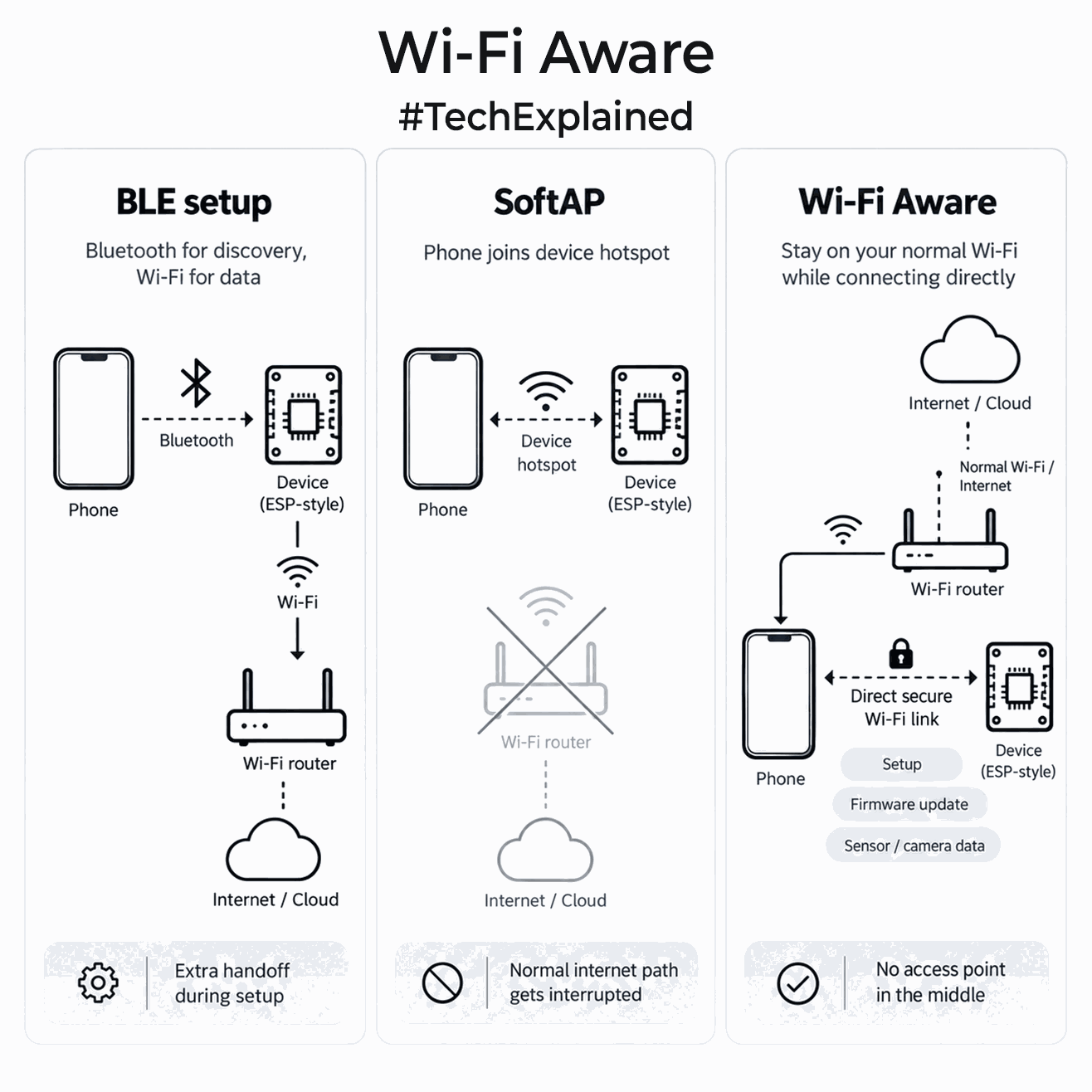
WiFi Aware allows nearby devices to discover each other, pair securely and create a direct WiFi link without joining an access point. There is no router, DHCP server or internet connection in the middle. Your phone can also stay on its normal WiFi while talking to the device.

How WiFi Aware works?

Things get interesting on the device setup side. Today, many connected products use Bluetooth only to find the device and pass WiFi credentials. Others create a temporary SoftAP, forcing your phone to switch networks just to configure the product.

With WiFi Aware, the app can discover the device, establish a secure connection and communicate over normal IP networking directly. That same link can be used for configuration, firmware updates, file transfer, camera feeds or higher-rate sensor data. If the product later needs cloud access, you can still pass the home WiFi credentials over this link. It also fits portable instruments, cameras and diagnostic devices that only need a fast local link to your phone, with no router involved.

Android has actually supported WiFi Aware since Android 8.0. The catch is that support depends on the phone’s WiFi chipset, firmware and manufacturer, so you cannot assume every Android phone has it. Apple joining with iOS 26 changes the ecosystem significantly because iPhone 12 and newer now support it.

Last month, Espressif also added WiFi Aware support for selected ESP32 families. It is still early, and support is not universal across ESP32 variants.

I think it will be a great shift. A product that currently carries Bluetooth mainly for commissioning could eventually use one WiFi radio for discovery, secure setup and high-bandwidth local communication. I really hope more chip vendors implement it. I want my phone to stay connected to WiFi and the internet while maintaining a separate direct link to a device.

If you liked the post, Share it with your friends!

Tech Explained : USB Killers

Today let’s revisit an older piece of hardware security tech. I just wanted to illustrate that this tech is out there for informative purposes. A naive looking USB drive can fry your personal device.

The USB Killer appeared publicly around 2015. Early versions looked like ordinary USB Type-A drives, but instead of exchanging data, they used power from the port to create destructive electrical pulses. The idea later became a commercial stress-testing product, and the current generation is USBKill V4.

Fundamentally, the hardware has four blocks. It takes a low-voltage energy source, feeds a voltage-conversion stage, stores energy in capacitors, then switches that stored energy back into USB signal circuitry. Early designs charged the capacitors to around -110V, while later versions reached roughly -220V.

The interesting part is why normal USB current limiting on your host is not necessarily saving you. The host may limit how much current a device draws from 5V, but the device can accumulate that energy slowly and release it very quickly. Repeated pulses can over-stress ESD protection, damage the USB block in your PC, and potentially reach a hub, controller or SoC behind it.

USB-C made the original approach harder because a compliant Type-C source waits for a valid connection before enabling VBUS. Modern USBKill V4 versions can carry an internal battery, so they no longer need the target to supply that energy. Adapters also extend them to USB-C and other interfaces. Survival still depends on the host’s protection design.

Why does such hardware exist beyond malicious use as of today? Its role is destructive stress testing, helping hardware teams test whether ports survive abnormal electrical events and whether protection fails safely. It’s a tool that can be misused.

Your takeaway today should be to treat an unknown USB device as unknown hardware, not just unknown storage. A random device can severely damage a port or motherboard before software security gets any chance to react. You need to know that this exists.

If you liked the post, Share it with your friends!
1 2 3 … 23